If you are a student in 2025, using the right apps can make your studies smoother and more efficient. From note-taking and time management to staying focused and learning new subjects, these free study apps will help you perform better in school or college.
1. Notion
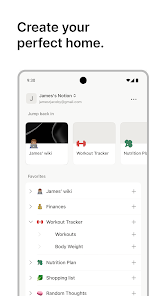
Notion is one of the most versatile productivity apps for students. It allows you to create pages for different subjects, build custom planners, and take detailed notes. You can also create tables, checklists, and databases for tracking assignments and deadlines. Notion is perfect for both solo study and group projects since it allows collaboration in real time. It is easy to customize, making it ideal for students who want everything in one workspace.
- Best for: Organizing study material and projects
- Platforms: Android, iOS, Web
- Why you should use it: Keeps all notes, tasks, and study plans in one clean dashboard
2. Google Keep
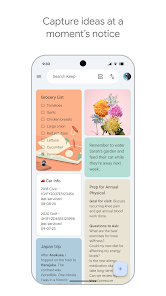
Google Keep is a lightweight note-taking app designed for quick ideas, to-do lists, and reminders. You can add color-coded notes, voice memos, and even photos. It automatically syncs with your Google account, so your notes are accessible across all your devices. The app’s simple interface and integration with Google Docs and Google Calendar make it ideal for students who need a fast and easy way to organize their daily tasks.
- Best for: Quick notes and reminders
- Platforms: Android, iOS, Web
- Why you should use it: Fast, simple, and perfect for short notes or ideas during study sessions.
3. Forest
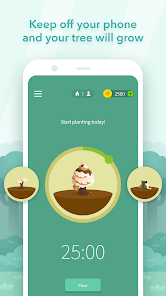
Forest helps you stay focused by turning study time into a fun challenge. When you start studying, you plant a virtual tree that grows as long as you stay off your phone. If you leave the app, the tree dies. Over time, you can grow an entire virtual forest that shows your focus progress. The app also partners with tree-planting organizations to plant real trees. This makes it great for improving focus while contributing to the environment.
- Best for: Staying focused and avoiding distractions
- Platforms: Android, iOS
- Why you should use it: Makes focus fun and builds good study habits.
4. Grammarly
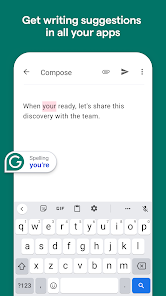
Grammarly is an essential tool for any student who writes essays, reports, or emails. It checks grammar, spelling, and punctuation while suggesting better sentence structures and tone improvements. The free version covers basic writing corrections, while the premium version adds advanced features like plagiarism detection. Grammarly works on browsers, mobile devices, and even in Microsoft Word.
- Best for: Writing correction and improvement
- Platforms: Android, iOS, Web
- Why you should use it: Helps you write clear, professional, and error-free content.
5. Microsoft OneNote
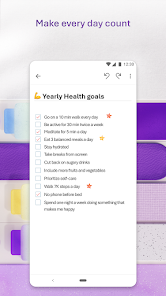
OneNote is one of the most complete note-taking apps available. You can write or draw notes by hand, type them, or record audio notes during lectures. The app lets you organize your notes into notebooks, sections, and pages for easy access. It syncs automatically across devices through OneDrive, so you can review your notes anytime. OneNote also supports sharing, making it excellent for group projects and study collaborations.
- Best for: Detailed note-taking and class organization
- Platforms: Android, iOS, Windows, Mac
- Why you should use it: Combines handwritten, text, and multimedia notes in one place.
6. Khan Academy
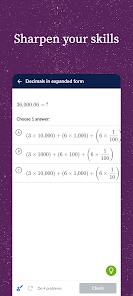
Khan Academy is one of the best free education platforms. It offers courses in math, science, history, economics, and more. The lessons include videos, exercises, and progress tracking. The app allows you to study at your own pace and revisit topics until you understand them fully. It’s especially useful for high school and college students preparing for exams or improving weak subjects.
- Best for: Learning new topics and practicing skills
- Platforms: Android, iOS, Web
- Why you should use it: 100% free and trusted by teachers and students worldwide.

7. Todoist
Todoist helps students plan and manage tasks efficiently. You can create projects, set priorities, and schedule reminders. The app uses a clean design that makes it easy to see what needs to be done each day. It also offers recurring tasks and productivity charts to help you track progress over time. Whether you are working on assignments or preparing for exams, Todoist helps you stay organized and consistent.
- Best for: Task management and productivity
- Platforms: Android, iOS, Web
- Why you should use it: Keeps your daily study schedule under control.
8. Quizlet
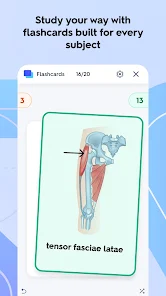
Quizlet is a learning tool that helps students study through flashcards, games, and quizzes. You can create your own flashcard sets or access millions created by other users. The app uses spaced repetition to help you remember terms and concepts longer. It’s especially useful for memorizing vocabulary, definitions, and formulas. Quizlet also supports offline learning, so you can study anytime.
- Best for: Memorizing and reviewing lessons
- Platforms: Android, iOS, Web
- Why you should use it: Makes studying active and more effective.
9. Evernote
Evernote is a powerful app for organizing your notes, articles, and research material. You can save text, images, PDFs, and web pages in one notebook. It also has a strong search feature, allowing you to find notes quickly. Evernote syncs across all devices, so your study material is always available. It’s perfect for students who need a reliable app to manage large amounts of information.
- Best for: Research and long-term note storage
- Platforms: Android, iOS, Web
- Why you should use it: Keeps all your study materials neat and searchable.
10. Google Drive
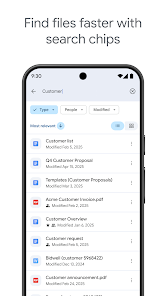
Google Drive offers 15 GB of free cloud storage for your documents, notes, and assignments. You can upload files, create new documents, and share them with classmates for group projects. Drive integrates with Google Docs, Sheets, and Slides, making collaboration easy. Files are accessible from any device, so you never lose your work. It’s a must-have tool for every student who needs secure, free cloud storage.
- Best for: File storage and collaboration
- Platforms: Android, iOS, Web
- Why you should use it: Free, reliable, and easy to share documents with others.
Conclusion:
These free study apps help students stay focused, manage tasks, and learn more efficiently. Whether you want better notes, time management, or improved writing, there’s an app here for you. Try a few of them and see which ones fit your learning style best.
You can also check our Apps, AI Tools, and Games pages to discover more helpful tools and fun games for your daily use.